Error: Invalid Configuration for device ‘0’
I have just had a VM move to a different host in a cluster (due to a hardware failure on the original host) but once complete it was inaccessible over the network. I logged on to the VM using the console and spotted the NIC was not connected. I edited the properties of the VM to connect the NIC but that generated an error:
Error: Invalid Configuration for device ‘0’
The fix for this was to locate a free port on the dSwitch (without a "connectee" and state not showing "Link Up"):
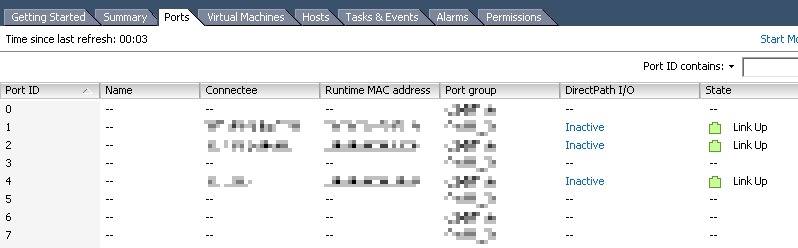
Then assign this port to the network adapter in the VM properties:
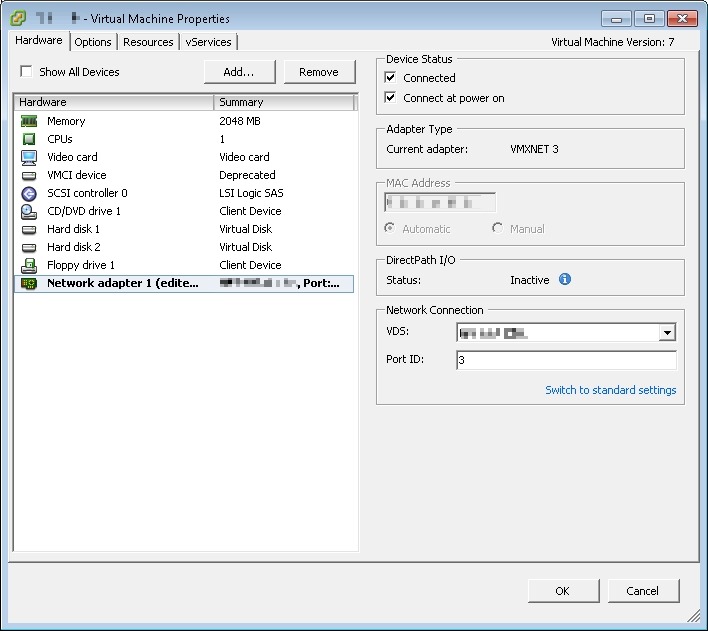
![[BlogBookmark]](http://www.adventuresinvmware.co.uk/wp-content/plugins/bookmarkify/blogbookmark.png)
![[Blogsvine]](http://www.adventuresinvmware.co.uk/wp-content/plugins/bookmarkify/blogsvine.png)
![[del.icio.us]](http://www.adventuresinvmware.co.uk/wp-content/plugins/bookmarkify/delicious.png)
![[Digg]](http://www.adventuresinvmware.co.uk/wp-content/plugins/bookmarkify/digg.png)
![[Facebook]](http://www.adventuresinvmware.co.uk/wp-content/plugins/bookmarkify/facebook.png)
![[Furl]](http://www.adventuresinvmware.co.uk/wp-content/plugins/bookmarkify/furl.png)
![[Google]](http://www.adventuresinvmware.co.uk/wp-content/plugins/bookmarkify/google.png)
![[LinkedIn]](http://www.adventuresinvmware.co.uk/wp-content/plugins/bookmarkify/linkedin.png)
![[MySpace]](http://www.adventuresinvmware.co.uk/wp-content/plugins/bookmarkify/myspace.png)
![[Reddit]](http://www.adventuresinvmware.co.uk/wp-content/plugins/bookmarkify/reddit.png)
![[Slashdot]](http://www.adventuresinvmware.co.uk/wp-content/plugins/bookmarkify/slashdot.png)
![[StumbleUpon]](http://www.adventuresinvmware.co.uk/wp-content/plugins/bookmarkify/stumbleupon.png)
![[Twitter]](http://www.adventuresinvmware.co.uk/wp-content/plugins/bookmarkify/twitter.png)
![[Windows Live]](http://www.adventuresinvmware.co.uk/wp-content/plugins/bookmarkify/windowslive.png)
![[Yahoo!]](http://www.adventuresinvmware.co.uk/wp-content/plugins/bookmarkify/yahoo.png)
![[Email]](http://www.adventuresinvmware.co.uk/wp-content/plugins/bookmarkify/email.png)